
IT Process Development
Breaking down enterprise data silos and providing full-chain digital management solutions from R&D and design to collaborative office work and warehousing logistics.
PDM
Product Data Management
PLM
Product Lifecycle Management
OA
Office Automation
WMS
Warehouse Management System
CMS
Content Management System
-
Take Control of Data, Unlock Engineering Potential
PDM stands for Product Data Management. It is a system for centrally managing product-related data and processes. Engineers can use PDM software to track revisions, manage change orders and generate BOMs.
CAD-integrated product data management eliminates collaboration barriers, reduces time spent on non-value-added tasks and improves product development agility.

Building a powerful engineering ecosystem with PDM
-
Design with Confidence
Share, track and manage all product data in a secure, centralized system so that team members around the world can collaborate efficiently while reducing project risk.
-
Agile Transformation
Enable everyone to access the right data at the right time in a centralized system, so as to control design processes, reduce errors and improve development agility.
-
Connecting Everyone
Extend external project collaboration into a secure workspace where you can maintain access control, version control and traceability.
-
Improve Work Efficiency
Reduce search time and increase working time. Easily find and access files to replace, reuse or approve, minimizing rework and repetitive tasks.
PDM FAQ
-
How PDM Speeds Up Product Development
PDM software helps companies bring products to market faster by consolidating all project data in one place. This reduces time spent on low-value tasks and improves product development agility and collaboration.
-
How PDM Works
PDM integrates with design and business tools to manage data and automate workflows and engineering processes, capturing the entire history of a design.
-
The Benefits of PDM
Product data management helps you take control of project data so you can:
- Improve product development agility: Access data in real time, flexibly and conveniently, through multi-CAD integration. With PDM, your design workflow fits your business needs well.
- Foster internal and external collaboration: Share 3D or 3D views of your work with others (even people outside the company firewall) and annotate and give feedback quickly directly within PDM software.
- Reduce cumbersome processes: Easily find and access files to replace, reuse or approve for use in new designs. Leverage existing design data to cut search time and free up more time for valuable work.
- Reduce errors and improve product quality: Automate engineering change orders, revision control and BOM management. With PDM software, you stay in control of engineering processes.
-
The Difference Between PDM, PLM and ERP
PDM (Product Data Management), PLM (Product Lifecycle Management) and ERP (Enterprise Resource Planning) are complementary systems. PDM integrates with CAD software to automatically track changes, revisions and design history as engineers and designers work. ERP focuses on business execution processes such as inventory, logistics and service. PLM focuses on the product methodology, from concept to engineering to production, and connects everyone involved throughout the product lifecycle to a central source of information.
-
What PDM Systems Are Used For
A product data management system centrally manages product-related data and automates engineering processes. Engineers use PDM systems to track revisions, manage change orders and generate BOMs.
-
The Role of Product Data Management
Using a PDM system helps ensure that everyone in your organization works from the latest, accurate data while promoting collaboration among internal and external stakeholders. PDM also automates engineering processes, reducing time spent on low-value tasks and shortening time to market.
-
Data and Process Management That Fits Your Business
PLM stands for Product Lifecycle Management. PLM software helps provide enterprise-wide collaboration for everyone involved in a product's lifecycle, from engineering and supply chain planning to sales and service. Everyone works from a single central data source, giving you clearer visibility into what is happening across product lines.
PLM software is a solution for managing data and processes throughout the entire product lifecycle (from initial concept to development, manufacturing, service and retirement). PLM provides comprehensive support for the daily activities of every engineering and technical team. PLM software offers many capabilities, such as new product introduction (NPI), BOM data management, change management, compliance management and quality management.
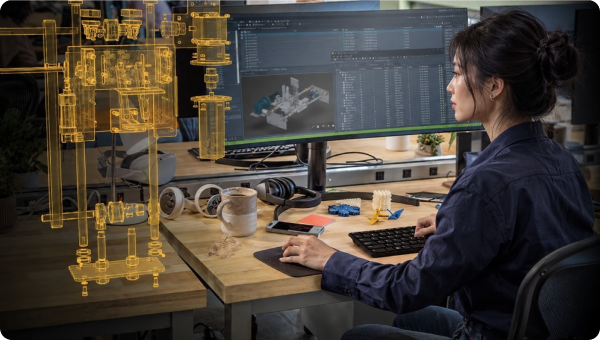
Everyone works from a single central data source
-
Simplify Processes
Speed up development with centralized CAD-integrated PLM and automated workflows, freeing up more time for high-value tasks.
-
Empowering Dynamic Decision-Making
With system-wide real-time data sharing, collaboration is greatly improved, enabling more informed decisions earlier in the process and better control of costs and materials.
-
Connecting the Supply Chain
Improve supply chain collaboration and shorten response times through easier order visibility and traceability, plus real-time tagging and feedback loops.
-
Faster Time to Market
Adapt in real time to a constantly changing market (from concept to production), improving innovation capability, reducing iteration cycles and lowering costs.
PLM FAQ
-
Advantages of PLM
PLM systems help enterprises achieve comprehensive product management and control, improve product quality, reduce costs, shorten time to market, and strengthen collaboration with suppliers and customers. Through a unified data platform, all departments can work from the same up-to-date data, reducing duplicated effort and communication costs.
-
Why Product Lifecycle Management Matters
In most companies, departments operate in silos, product information can become outdated, and isolated cross-organizational teams often lead to inconsistent data. Complex, duplicated and inconsistent product information wastes time, increases costs and degrades product quality.
PLM systems avoid these problems by establishing a single source of truth that gives all relevant people access to the latest, accurate product information.
-
Which Industries or Fields Use PLM?
Many industries use PLM, from manufacturing to life sciences and consumer goods. Manufacturing (especially discrete manufacturing) is the primary application area for PLM, along with automotive, aerospace, medical devices, electronics, apparel, and food and beverage industries.
-
Main Components or Functions of PLM
PLM systems typically include the following core functions: product data management (PDM), BOM management, change management, project management, compliance management, quality management, supplier collaboration and document management. Enterprises can choose the appropriate modules according to their business needs.
-
What PLM Is Used For
PLM manages a product's entire lifecycle from concept to retirement, including product data, processes and people. It helps enterprises collaborate across departments and regions, ensures the accuracy and consistency of product information, and supports smarter decision-making throughout the product lifecycle.
-
The Difference Between PDM and PLM
PDM (Product Data Management) focuses mainly on managing product data and engineering documents; PLM (Product Lifecycle Management) has a broader scope and, in addition to data management, covers process and people collaboration throughout a product's lifecycle from concept, design and manufacturing to service and retirement.
-
How PLM Supports Product Development and Innovation
By providing a unified data platform and collaborative environment, PLM enables design, engineering and manufacturing departments to work in parallel, reducing duplicated effort and communication costs — speeding up product development and freeing up more time for innovation.
-
How PLM Helps Collaboration and Communication Across Teams and Departments
By establishing a single source of truth, PLM gives all relevant people access to the latest, accurate product information. Both internal teams and external suppliers can collaborate on the same platform, reducing errors and delays in information transfer.
-
How PLM Supports Supply Chain Management and Supplier Collaboration
Through easier order visibility and traceability, plus real-time tagging and feedback loops, PLM helps enterprises build closer collaboration with suppliers, shorten response times and reduce supply chain risk.
-
Efficient Collaboration Makes Office Work Simpler
An OA (Office Automation) system is a platform that helps enterprises digitize daily office processes, enable information collaboration and automate approvals.
Through a unified work platform, an OA system centrally manages daily office scenarios such as approvals, attendance, notices, meetings, tasks and documents, reducing repetitive communication and manual operations and making enterprise office work more standardized and efficient. Through process automation and unified information management, it digitizes the entire process from item initiation and approval routing to result archiving, improving internal collaboration efficiency.
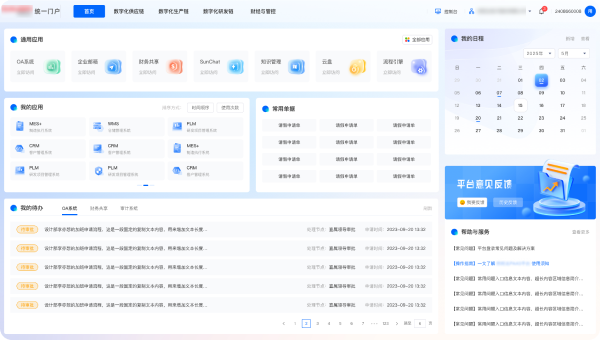
Efficient Digital Office System with OA
-
Simplify Office Processes
Handle daily affairs such as leave requests, reimbursements, procurement, seal use and business trips online in a unified way, reducing paper documents and repetitive operations.
-
Automated Process Approval
Automatically match approval workflows based on enterprise rules; once submitted, items are automatically routed to the responsible person, improving approval efficiency.
-
Connecting Team Collaboration
Centrally manage notices, tasks, meetings and schedules so team members can quickly get work progress and collaborate.
-
Improve Work Efficiency
Reduce repetitive communication and manual statistics, giving employees more time for core work and improving overall office efficiency.
OA Core Functions
-
Intelligent Management for More Efficient Warehousing
A WMS warehouse management system digitally manages the entire warehouse operation around core activities such as inbound, put-away, inventory, picking and outbound, helping enterprises track inventory status in real time and improve warehousing efficiency and accuracy.
Through unified management of data such as barcodes, storage locations, inventory and orders, it enables full-process visualization of warehousing operations, reducing manual operations and inventory discrepancies and making warehouse management more precise and efficient.

Efficient Smart Warehousing with WMS
-
Precise Inventory Management
Track product quantities, storage locations, batches and inventory status in real time, reducing inventory discrepancies and making inventory data more accurate.
-
Efficient Inbound Processing
From receiving, inspection and put-away to completing inbound, the process is managed online to improve inbound efficiency.
-
Intelligent Picking and Outbound
Generate picking tasks based on orders and inventory status, optimize picking routes, and reduce manual searching and repetitive operations.
-
Improve Warehousing Efficiency
Through inventory alerts, storage location management and operation data analysis, optimize warehousing resource allocation and improve overall warehouse operating efficiency.
WMS Core Functions
-
Unified Management for More Efficient Content
A CMS content management system helps enterprises centrally manage digital content such as articles, images, videos, product information and announcements, achieving full-process digital management of content creation, editing, review, publishing and archiving.
Through a unified content library, permission management and publishing workflow, teams can quickly create and maintain content and flexibly publish it to the official website, mobile platforms and other digital channels, improving content operation efficiency.
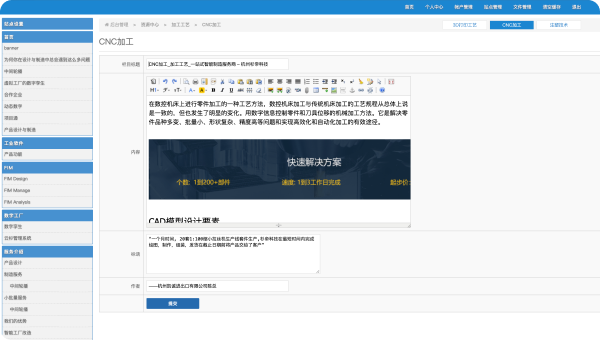
Efficient Digital Content System with CMS
-
Centralized Content Management
Store and manage articles, images, videos, product materials and other content in a unified way, reducing information fragmentation and duplicated maintenance.
-
Efficient Creation and Publishing
Visual editing and a standardized publishing workflow make content faster and smoother from creation and review to publishing.
-
Flexible Team Collaboration
Support different roles in content editing, review and management, enabling teams to collaborate on content production according to permissions.
-
Improve Operational Efficiency
Through content classification, search, version management and data statistics, reduce content maintenance costs and improve overall operational efficiency.